

Music
The Music app is your own private music service. Tune in to AI radio stations, browse the world’s catalog of artists, albums, and songs, follow along with synced lyrics, save what you love for offline play, and share stations and playlists with your household. It can also generate original instrumental music and remix MIDI files, fully offline. There’s no account to sign in to and nothing tracking what you listen to.
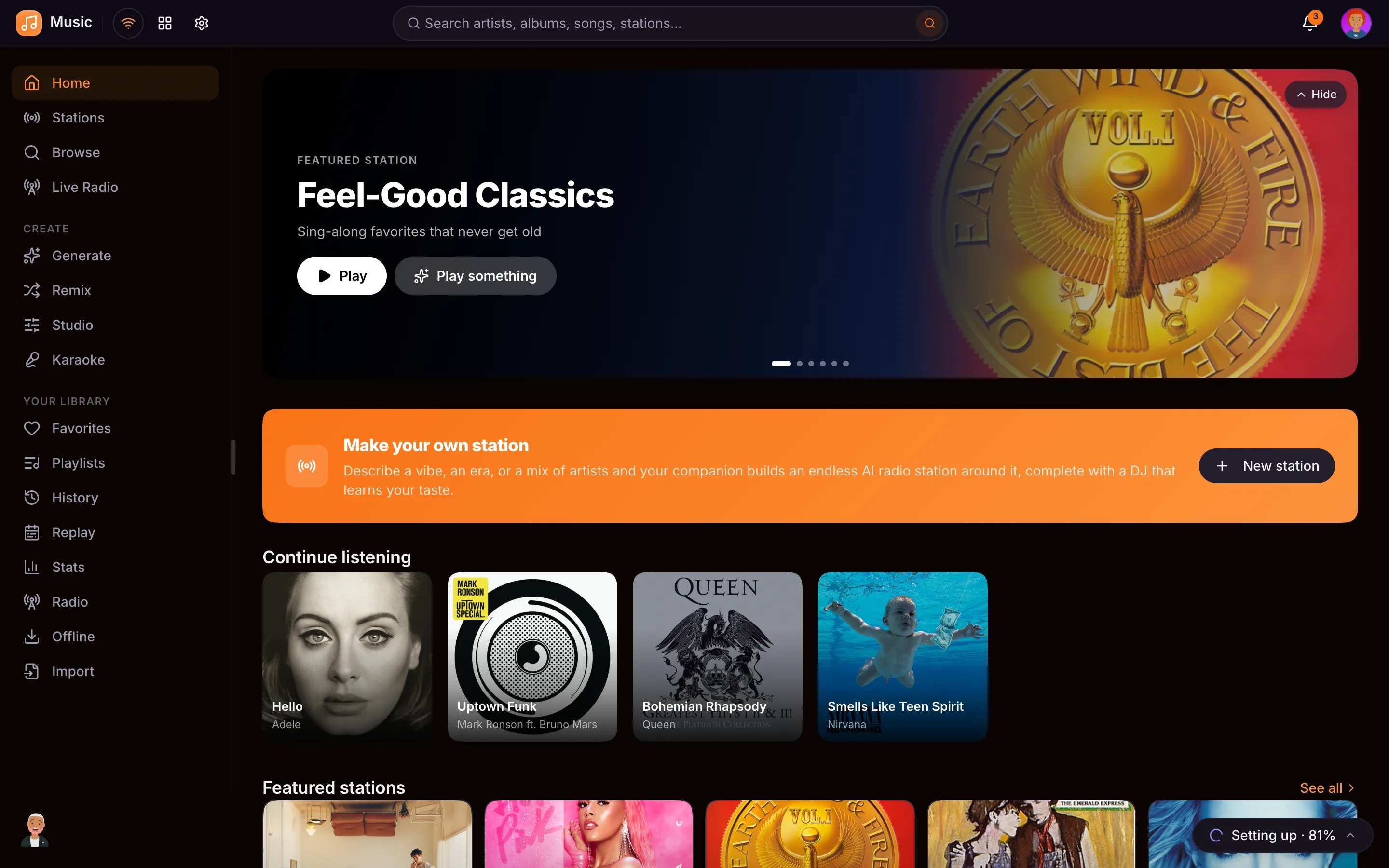
Finding your way around
Music has a menu down the left side. If it feels like a lot, go to Settings → Appearance → Menus and turn on Use tabs inside apps. Music then shows five tabs along the top instead: Home, Browse, Radio, Library, and Create. Everything is still there, just gathered into fewer places. The occasional things, like your listening stats or a year in review, are listed under More at the bottom of the Music home screen.
The same switch does this for Videos, Podcasts, Movies, Shows, the App Store, and Companions. It is yours alone, nobody else in the house is affected, and you can turn it back off whenever you like.
Stations
Stations are the heart of the app: generative AI radio that builds a fresh mix every time you tune in.
- 120+ built-in stations, organized into browsable categories: Genres, Decades, Eras, Moods, Activities, Movies, TV & Cartoons, Gaming, Global, Classics, and more. Filter by category with the chips at the top.
- Make your own: give a station a name and describe what it should play (”80s synthwave for late-night drives, instrumental-leaning, no big radio hits”), pick a color and a DJ style, and it builds a station around your description.
- Instant stations: click any artist or song to start a station around it, the way Apple Music does.
- The AI DJ can introduce songs between tracks. Choose Full DJ, DJ minimal (just announces each song), or Silent, and flip it live from the player. Your choice sticks across stations.
Stations pull from YouTube Music, so every track is real music: no video essays, trailers, or clips.
Browse the catalog
Search the full music catalog by artist, album, or song. Open an artist to see their discography and a Wikipedia bio, open an album for its tracklist, or just play any song instantly: it starts as fast as clicking a YouTube video.
Now Playing
While a station plays, the Now Playing screen shows:
- Lyrics: time-synced where available, highlighting along with the song.
- About: background on the song and artist from Wikipedia.
- Up Next: what’s coming in the queue.
Plus a sleep timer and quick controls to favorite, download, skip, or change the DJ mode.
Your Library
Everything you collect lives in your Library:
- Favorites: songs and stations you’ve hearted.
- Playlists: your own curated track lists (separate from the generative stations).
- History: recently played, so you can pick back up.
- Offline: songs and whole stations saved for offline listening (audio only, at your chosen quality).
- Created: the tracks you’ve generated or remixed.
Sharing with your household
Any station or playlist you make can be shared with the family: everyone can play it and see who made it, while only you can edit it. Don’t want to share? Keep it private. You can also favorite someone else’s shared station (it stays linked to theirs) or make a copy to tweak the prompt yourself.
Generate
Create original instrumental music on the spot: no internet, no cloud, no model to download. Pick a style (Warm, Lo-fi, Cinematic, Synthwave, Funk, Ambient, and more) and a type:
- Full track: a longer stand-alone piece that builds in and rings out.
- Loop / bed: a seamless piece to loop under something else.
- Intro or Outro: short stings, like the ones used for podcast shows.
You get six different takes each time; nudge the tempo, key, or length, then save the one you like to your Library.
Remix
Drop in a MIDI file and the Remix tool restyles it: it keeps your actual notes (melody, bass, and chords stay the composer’s own) and re-points them to a chosen style’s instruments with a fresh beat underneath. You get several takes to choose from, then save your favorite.
Privacy & offline
Catalog data comes from open sources (MusicBrainz, Cover Art Archive, Wikipedia, LRCLIB) and playback streams through your own server: no Google account, no recommendation engine tracking you. Generate and Remix run entirely in your browser, so they work the same on a plane as at home.